
Troubleshooting Common Sensor Installation Issues

Installing a sensor might seem like a simple task, but small mistakes can lead to big problems. When a machine is not working correctly, the sensor is often the first thing to check. Many vibration sensor manufacturers in Arizona focus on creating tough tools, but even the best tools need to be put in place the right way. If a sensor is loose or in the wrong spot, it will not give the right information.
Why Correct Installation Matters
A sensor is like a doctor’s stethoscope. It listens to the machine to make sure everything is okay. If the “ears” of the machine are not touching the right spot, they cannot hear the trouble. Good installation keeps machines running and saves money on repairs.
Using a Wireless Vibration Sensor
One of the easiest ways to monitor a machine is by using a wireless vibration sensor. These devices are great because they do not need long, messy wires to send data. However, they still need to be placed on a flat, clean surface to work well. If there is dirt or paint between the sensor and the machine, the signal might be weak or wrong.
Common Problems and Simple Solutions
There are a few main reasons why sensors fail after they are installed. Most of the time, the problem is not the sensor itself but how it was put on the machine.
1. Poor Surface Preparation
If a surface is bumpy, oily, or covered in thick paint, the sensor cannot “feel” the vibrations properly. This is like trying to hear a heartbeat through a thick winter coat.
- The Fix: Always clean the area with a cloth and a little bit of cleaner. If the surface is rough, it may need to be sanded down until it is smooth and shiny.
2. Loose Mounting
A sensor that is not tight will shake on its own. This creates “noise” that confuses the computer. It might look like the machine is breaking when it is actually just a loose screw.
- The Fix: Use the right tools to tighten the sensor. Do not just use your fingers. Many vibration sensor manufacturers in Arizona suggest using a specific amount of force, called torque, to keep it steady.
3. Bad Placement
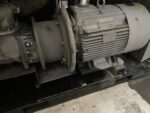
Putting a sensor on a thin metal cover instead of the heavy motor frame is a common mistake. The cover shakes differently from the internal parts we want to monitor.
- The Fix: Place the sensor as close to the moving parts as possible. For motors, this usually means right on the bearing housing.
Different Ways to Attach Sensors
There are three main ways to stick a sensor to a machine. Each one has a different job.
| Method | Best Use | Speed of Setup |
| Stud Mount | Permanent and very accurate | Slow (requires drilling) |
| Adhesive/Glue | When drilling is not allowed | Medium |
| Magnet | Temporary checks | Very Fast |
A wireless vibration sensor can often be moved from one machine to another using a magnet. This is helpful for quick check-ups. However, for a sensor that stays on the machine forever, a stud or strong glue is much better.
Dealing with Signal Issues
Sometimes the sensor is on tight, but the data still looks strange. This can happen because of “interference.” This is like trying to talk to a friend while a loud airplane flies overhead.
In the world of technology, a wireless vibration sensor uses radio waves to talk to a computer. If there are big metal walls or other electronics in the way, the message might get lost. Moving the receiver closer to the sensor usually solves this problem.
Checking the Battery and Power
Since there are no wires, these sensors need batteries. If a sensor stops sending data, the battery is the first thing to look at. Extreme heat or cold can make batteries die faster than usual.
Many vibration sensor manufacturers in Arizona build sensors that can handle the desert heat. Still, it is a good idea to check the battery levels every few months to make sure the machine is always being watched.
Using the Right Tools
Using the wrong glue or a weak magnet can cause a wireless vibration sensor to fall off. If a sensor falls, it could break or get caught in moving parts. This is dangerous for the machine and the people working nearby.
Always follow the instructions that come with the device. Most vibration sensor manufacturers in Arizona provide a guide that shows exactly which glue or screw to use for the best results.
Keeping it Clean
Dust and water are enemies of electronics. Even if a sensor is “waterproof,” it is best to keep it as dry as possible. If water gets into the connection point, it can cause a short circuit. This will stop the sensor from working entirely.
- Tip: Check the seals and covers on your sensors during every routine maintenance walk.
Summary Checklist for Success
To make sure every installation goes perfectly, follow these simple steps:
- Find a flat, solid spot on the machine frame.
- Clean away all dirt, grease, and paint.
- Tighten the sensor using the correct tools.
- Check that the wireless vibration sensor has a clear path to send its signal.
- Test the sensor to see if the data looks normal.
Frequently Asked Questions
1. Can I install a sensor on a painted surface?
It is best to remove the paint first. Paint acts like a cushion and can hide the small vibrations that the sensor needs to detect.
2. How do I know if my sensor is loose?
The data will usually show very high, strange spikes that don’t match how the machine sounds. If you can move the sensor with your hand, it is too loose.
3. Why is my wireless sensor not connecting?
Check for large metal objects between the sensor and the receiver. Also, make sure the battery is fresh, and the sensor is turned on.
4. Is a magnet mount good for permanent use?
No, magnets can slide or vibrate loose over time. For a permanent setup, use a screw or strong industrial glue.
5. Where is the best place to put a vibration sensor?
The best place is directly on the bearing housing. This is where the most important vibrations come from.
Get Professional Help with QI Dynamics
If you need help choosing the right equipment or setting up your system, contact the experts. QI Dynamics provides top-quality monitoring solutions to keep your facility running smoothly. Whether you need a single wireless vibration sensor or a full system for your factory, the team is ready to help you succeed.
Recent Posts